BigPanda - ServiceNow v3 incidents store app
Assistance required
The BigPanda - ServiceNow v3 integration includes major architectural changes, including new security roles, and deprecated API patterns. The upgrade process must be planned and coordinated with your BigPanda account team.
Contact your BigPanda account team to discuss next steps to upgrade to a 3.x integration version.
The BigPanda ServiceNow integration v3.0 is now available on the ServiceNow Store. This is a complete rebuild of the integration, certified by ServiceNow, that brings significant performance, security, and functionality improvements to your incident management workflows.
Key features
Faster incident creation - Alert processing is 94% faster, reducing the alert to ServiceNow ticket time from minutes to seconds. For high-volume environments, this means your team sees incidents sooner and can respond faster.
Lower impact on your ServiceNow instance - Intelligent caching and batch database operations reduce load on your ServiceNow instance by 90%, freeing up resources for other business-critical applications.
Stronger security posture - The v3 app meets ServiceNow Store certification standards, including encrypted credential storage, role-based access control, and full audit logging. All API credentials are stored using Password2 encryption.
Multi-organization support - Connect multiple BigPanda organizations to a single ServiceNow instance. This is ideal for enterprises managing separate business units, regional teams, or staging and production environments from one ServiceNow deployment.
Configuration with confidence - A new configuration interface provides version history, change comparison, and one-click rollback. You can review exactly what changed between versions and revert instantly if needed.
Supported versions
BigPanda App Version | ServiceNow Platform | Status |
|---|---|---|
v3.0.0+ | Xanadu or later | Current (recommended) |
v2.9.1 -2.x | Yokohama, Xanadu, Washington, Vancouver, Utah, Tokyo, San Diego, Rome, Quebec, Paris, Orlando, New York, Madrid, London, Kingston, Jakarta, Istanbul | Developer Store App |
< v2.9.0 | Yokohama, Xanadu, Washington, Vancouver, Utah, Tokyo, San Diego, Rome, Quebec, Paris, Orlando, New York, Madrid, London, Kingston, Jakarta, Istanbul | End of life — March 1, 2026 |
An active ITSM license is required for all versions.
Application Architecture
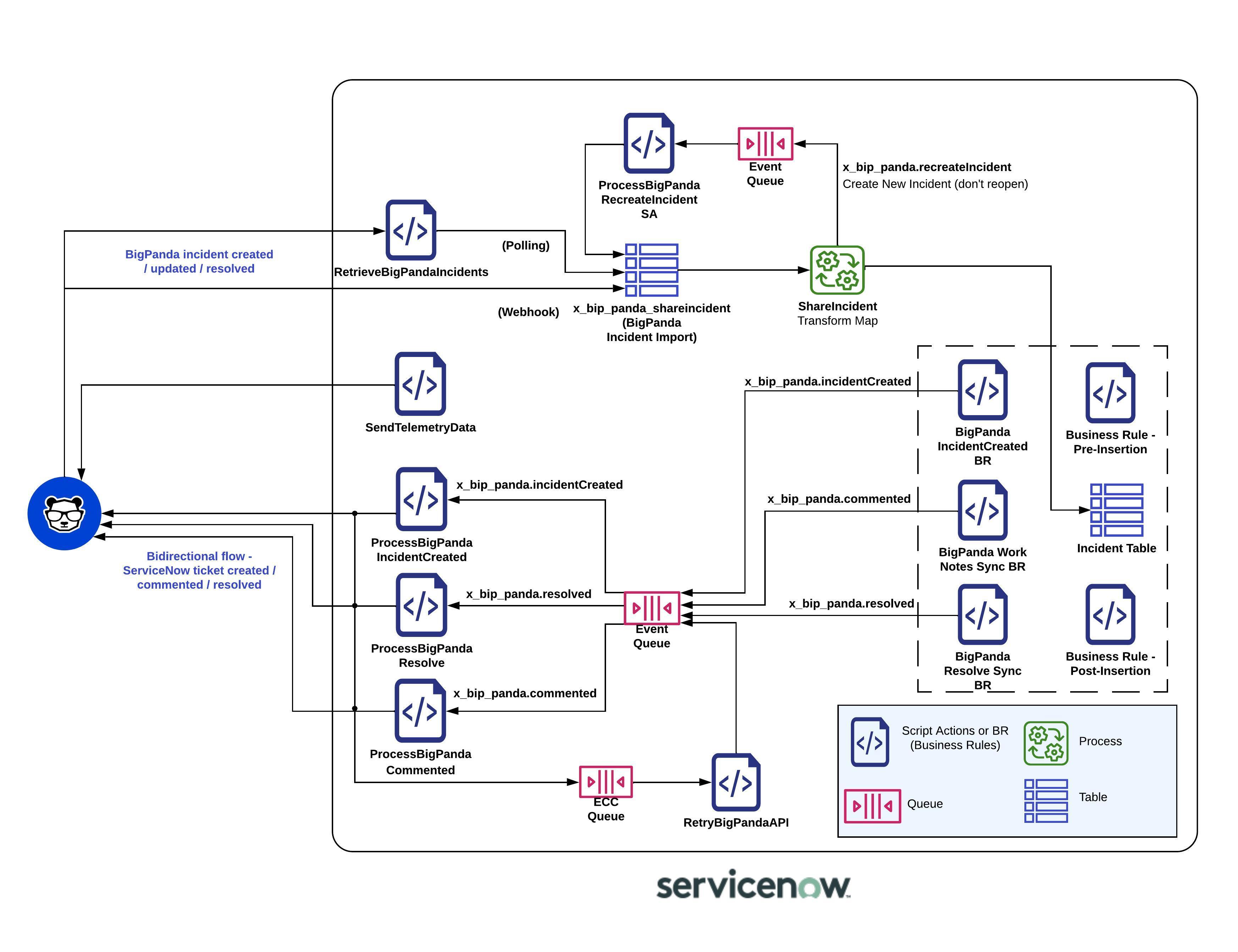
BigPanda ServiceNow Application Architecture
Key Improvements
Incident management
Bi-directional incident sync with configurable 15-second polling intervals.
Parent-child incident hierarchies for multi-alert grouping.
Incident task consolidation by assignment group.
Configurable tag sync direction (to BigPanda, ServiceNow, or both).
Flapping and snooze state handling.
AI-powered features
Automated Incident Analysis (AIA) summaries added to incident descriptions.
Root Cause Changes (RCC) correlation linking incidents to related change requests.
Similar Incidents detection using machine learning.
CMDB enrichment
CMDB v2 delta sync with hash-based change detection, sending only what changed instead of full table exports.
Automatic stale mapping recovery when BigPanda-side mappings are deleted.
Rate-limit handling with exponential backoff for large CMDB environments.
Changes and maintenance
Change request and change task data forwarded to BigPanda for root cause analysis.
Maintenance plans from both change requests and outage records.
CI resolution with a four-level fallback chain.
Transform rules engine
A no-code rules engine for customizing incident field mappings during import.
Condition-based logic with operators like equals, contains, regex, and more.
Actions include setting fields, setting tags, skipping records, and adding work notes.
Dry-run mode for testing rules before enabling them.
Operational improvements
Built-in automated testing framework to verify connectivity and data flow.
Comprehensive logging with configurable log levels (ERROR, WARN, INFO, DEBUG).
Privacy compliance module for GDPR and CCPA requirements.
Install the BigPanda ServiceNow Integration
To install any of the integration modules, follow the Install the ServiceNow instructions, then configure the module settings.
Upgrade to ServiceNow v3.x
Assistance required
The BigPanda - ServiceNow v3 integration includes major architectural changes, including new security roles, and deprecated API patterns. The upgrade process must be planned and coordinated with your BigPanda account team.
Contact your BigPanda account team to discuss next steps to upgrade to a 3.x integration version.
The process of upgrading to ServiceNow v3.x is a multi-step process that is focused on maintaining your configuration, settings, and security.
Your existing configuration values are automatically migrated from system properties to the new versioned configuration table.
Three fix scripts run automatically to handle migration, artifact cleanup, and default population.
All credential values are re-encrypted using Password2 encryption.
Your existing transform map customizations are preserved.
For detailed technical configuration, see the ServiceNow v3 data requirements documentation.
Next Steps
Begin app installation with Install the Bigpanda - ServiceNow v3.x app
Prepare for table and field mapping with the ServiceNow v3 data requirements
Investigate other ServiceNow integration options to connect BigPanda to your ITSM workflow
BigPanda - ServiceNow v3 data requirements
The BigPanda ServiceNow integration v3.0 is now available on the ServiceNow Store. This is a complete rebuild of the integration, certified by ServiceNow, that brings significant performance, security, and functionality improvements to your incident management workflows.
Assistance required
The BigPanda - ServiceNow v3 integration includes major architectural changes, including new security roles, and deprecated API patterns. The upgrade process must be planned and coordinated with your BigPanda account team.
Contact your BigPanda account team to discuss next steps to upgrade to a 3.x integration version.
Pre-upgrade checklist
Before upgrading from v2.9.x to v3.0.2, confirm the following with your BigPanda account team:
Your ServiceNow instance runs Xanadu or later.
You have an active ITSM license.
You have your BigPanda API credentials (bearer token, API key, and app keys for each module you use).
Outbound HTTPS access to your BigPanda API region is allowed from your ServiceNow instance.
You have identified which users need the
x_bip_panda_userandx_bip_panda.adminroles.The BigPanda integration service account in ServiceNow has both the
x_bip_panda_useranditilroles assigned.The BigPanda user or service account associated with the integration has the required minimum permissions: Autoshare, Incident Enrichment, Root Cause Changes, Incident Actions (All Environments), and Manage Environments. See the RBAC documentation for details on permissions in BigPanda.
You have documented any custom transform map modifications that should be preserved during migration.
Platform requirements
Requirement | v2.9.x | v3.0.2 |
|---|---|---|
ServiceNow platform | All supported releases | Xanadu or later |
ITSM license | Required | Required |
Application scope | Unscoped (global) | Scoped ( |
ServiceNow Store certification | No | Yes |
An active BigPanda subscription with API access is required for all versions.
Authentication
Credentials
The v3 integration requires the following credentials from your BigPanda account:
Credential | Description | Used By |
|---|---|---|
Primary API authentication token. | All API calls. | |
Organization-level API key. | Legacy and fallback authentication. | |
Incidents App Key | Integration-specific app key for incident data. | Incident sync module. |
Changes App Key | Integration-specific key for change request data. | Changes and maintenance module. |
OIM App Key | Integration-specific key for outbound integration management. | OIM module. |
During an upgrade, existing credentials are automatically migrated and re-encrypted.
Credential storage
Feature | v2.9.x | v3.0.2 |
|---|---|---|
Storage method | ServiceNow system properties | Versioned configuration table ( |
Encryption | Basic property encryption | Password2 encryption (ServiceNow standard for at-rest encryption). |
Scope isolation | Global scope (accessible to other apps) | Scoped application (isolated from other apps). |
Credential visibility | Visible in exports and logs | Never exposed in exports, logs, or client-side scripts. |
In v2.9.x, credentials were stored as system properties in the global scope. Any application or script with system property access could read them. In v3.0.2, all credentials are stored in the scoped x_bip_panda_config table using Password2 field types. This means credentials are encrypted at rest and isolated from other applications on your ServiceNow instance.
Network and connection requirements
API endpoints
The integration communicates with BigPanda over outbound HTTPS (port 443). No inbound connections to your ServiceNow instance are required.
Region | Base URL |
|---|---|
US |
|
EU |
|
Confirm with your account team which region applies to your organization.
Endpoint functions
Function | Description |
|---|---|
Retrieval endpoint | Polls BigPanda for pending incident shares. |
Callback endpoint | Sends incident lifecycle updates back to BigPanda. |
Changes endpoint | Sends change request data to BigPanda. |
Maintenance endpoint | Sends maintenance plan windows to BigPanda. |
CMDB endpoint (v1) | Uploads full CMDB table exports as CSV. |
CMDB v2 base URL | Sends delta CMDB updates using hash-based change detection. |
Connection defaults
Setting | Default | Description |
|---|---|---|
Polling batch size | 30 incidents | Number of incident shares retrieved per poll cycle. |
CMDB sync interval | 24 hours | How often CMDB data is sent to BigPanda. |
CMDB retry interval | 5 seconds | Wait time between retries on failed CMDB API calls. |
CMDB page size | 100 records | Number of CMDB records per API page. |
CMDB max pages | 10 | Maximum pages per CMDB table sync. |
CMDB max retries | 3 | Maximum retry attempts for failed CMDB calls. |
Firewall rules
If your ServiceNow instance uses restricted outbound access, allow HTTPS (port 443) traffic to your region's BigPanda API endpoint. No other ports or protocols are required.
Custom data tables
The v3 integration creates eight tables in the x_bip_panda scope. All tables are protected by access control lists (ACLs) and are isolated from other applications.
In v3.0.2, all data is stored in scoped custom tables with role-based access control and full audit logging.
Custom tables
Table | Purpose |
|---|---|
| Stores versioned configuration with encrypted credentials. Supports multiple BigPanda organizations. |
| Staging table for inbound incident data from BigPanda. Records are processed by transform maps and routed to the ServiceNow incident table. |
| Stores individual alert records associated with BigPanda incidents. |
| Maps each ServiceNow incident to its BigPanda counterpart. Stores runbook links, similar incident data, related changes, and external URLs. |
| Stores correlation relationships between entities with type classification and confidence scores. |
| Links similar incidents identified by BigPanda AI, including similarity scores and reasoning. |
| Links incidents to related change requests for Root Cause Changes (RCC) analysis. |
| Links incidents to external service desk tickets from third-party systems. |
Role requirements
ServiceNow roles
The v3 integration uses dedicated roles instead of relying on global ServiceNow roles.
Role | Label | Access Level | Typical Users |
|---|---|---|---|
| BigPanda User | Read-only access to all BigPanda tables. Can view configuration (credentials masked), incident metadata, similar incidents, and related changes. | NOC analysts, on-call engineers, and anyone who needs visibility into BigPanda data. |
| BigPanda Admin | Full access to all BigPanda tables. Can create, modify, and delete configuration versions, manage credentials, and run administrative operations. | Integration administrators responsible for setup and maintenance. |
Limited defaults for admin role
Assign x_bip_panda_user along with x_bip_panda.admin for users who need administrative access. The admin role does not automatically include read-only role permissions.
ITIL Role
As part of ServiceNow Store certification requirements, the itil role was removed from BigPanda application roles. The integration service account still requires ITIL-level access to create and update incidents in the ServiceNow incident table.
When creating the BigPanda service account in ServiceNow, assign both of the following roles:
x_bip_panda_user— grants access to BigPanda scoped tables and data.itil— grants the access needed to create, read, and update records in the incident table and other ITSM tables.
ITIL role required
Without the itil role, the integration service account will not be able to create or update incidents in ServiceNow.
BigPanda permissions
BigPanda follows the principle of least privilege. The user or service account associated with the ServiceNow integration must have the minimum permissions required to operate the integration. At minimum, assign the following BigPanda permissions:
Permission | Purpose |
|---|---|
Autoshare | Allows BigPanda to automatically share incidents to ServiceNow based on configured sharing rules. |
Incident Enrichment | Allows the integration to enrich incidents with CMDB data, similar incidents, and related changes. |
Root Cause Changes | Allows the integration to send root cause change data to ServiceNow. |
Incident Actions (All Environments) | Allows the integration to perform incident lifecycle actions (resolve, reassign, etc.) across all environments. |
Manage Environments | Allows the integration to manage environment-level configuration for incident routing and sharing. |
If any of these permissions are missing, the corresponding integration features will not function. Your BigPanda account team can verify that the service account has the correct permissions during onboarding or upgrade.
Security summary
Security Feature | v2.9.x | v3.0.2 |
|---|---|---|
Credential encryption | Basic | Password2 (at-rest encryption). |
Application scope | Global | Scoped ( |
Access control | Standard ServiceNow roles | 41 dedicated ACLs with role-based enforcement. |
Database operations | Standard GlideRecord | GlideRecordSecure (enforces ACLs in all code paths). |
Store certification | No | Yes (meets ServiceNow security and data handling standards). |
Audit logging | Limited | Full audit trail on configuration changes with version history. |
CMDB enrichment comparison
Feature | v2.9.x (CMDB v1) | v3.0.2 (CMDB v2) |
|---|---|---|
Sync method | Full CSV export of entire tables. | Delta sync with hash-based change detection. |
Data transferred | All records every sync cycle. | Only records that changed since the last sync. |
Rate limit handling | None. | Exponential backoff with jitter for API throttling. |
Stale mapping recovery | Manual. | Automatic detection and recovery. |
Resource impact | High (full table scans). | Low (incremental updates only). |
CMDB v1 (full sync) remains available for backward compatibility. CMDB v2 (delta sync) is the recommended mode for v3.0.2 deployments.
Configure the Integration in ServiceNow
Application Architecture
BigPanda ServiceNow Application Architecture
Disable Polling Script
In ServiceNow from the left sidebar navigate to BigPanda > Changes > Retrieve Incidents Scheduled Job.
Uncheck the Active box.
Click Update to save your settings.
Open the BigPanda Configuration Page
In ServiceNow, navigate to All > BigPanda > Admin > Configuration.
Set application scope to BigPanda
In the application scope picker, select the BigPanda application scope.
Scope must be set
If the BigPanda scope is not selected, your configuration changes may not be saved. Confirm the scope before making any changes.
Define connection settings
In the BigPanda configuration page, enter the following values:
Setting | Description |
|---|---|
| Bearer Token | Your BigPanda API bearer token. |
| API Key | Your BigPanda organization API key. |
| Incidents App Key | The app key for incident routing. |
| Changes App Key | The app key for change management routing. |
| CMDB Enrichment V2 API Key | The app key for CMDB delta sync and incident merge (optional). |
| OIM API Key | Your OIM API key (only if your organization uses OIM). |
| Incident URL base | The base URL for your BigPanda console, for example |
| Integration User Name | The ServiceNow username you created in Step 2. |
Confirm that the regional API endpoints are correct for your environment, then click Save.
During onboarding or upgrade, your BigPanda account team provides these credentials. When upgrading, existing credentials are automatically migrated and re-encrypted.
Configure the Incidents Module
The incidents module configuration is managed in the ServiceNow application, under BigPanda > Admin > Configuration.
Enable the Incidents Module
In ServiceNow, go to All > BigPanda > Admin > Configuration.
Open the Incidents tab.
Enable the Active checkbox.
Click Save.
This is the master switch for incident synchronization between BigPanda and ServiceNow.
Configure Module Settings
Configure the Incidents section.
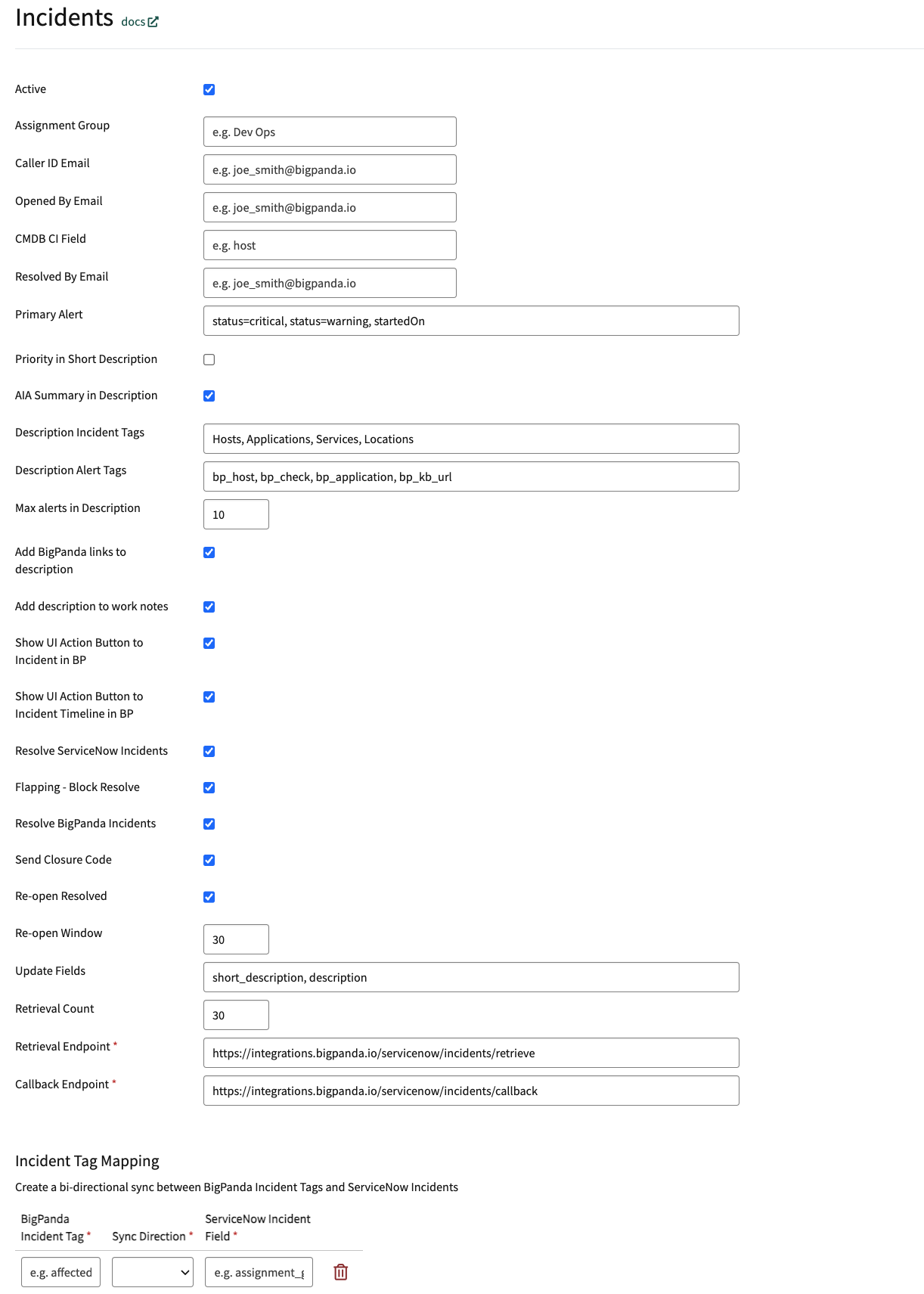
Incidents Settings
Parameter | Description |
|---|---|
Active | Enable this checkbox to activate incident synchronization. |
Assignment Group | The group to which BigPanda assigns new ServiceNow incidents. For example, |
Caller ID Email | A default email associated with the ServiceNow user calling in the incident. BigPanda searches for the caller's details and populates the Caller ID field. |
Opened By Email | A default email associated with the ServiceNow user who created the incident. BigPanda searches for the user's details and populates the Opened By field. |
CMDB CI Field | An alert tag representing the physical server of your system, such as |
Resolved By Email | The email address of the ServiceNow user that resolved the incident. |
Primary Alert | A comma-separated list of criteria for the alert you want to define as the Primary Alert. For example, |
Priority in Short Description | Include the BigPanda priority incident tag in a ServiceNow ticket's Short Description. |
AIA in Short Description | Include the AI-generated Incident Analysis Summary in a ServiceNow ticket's Description. |
Description Incident Tags | A comma-separated list of BigPanda incident tags to include in a ServiceNow ticket's Description. |
Description Alert Tags | A comma-separated list of BigPanda alert tags to include in a ServiceNow ticket's Description. |
Max alerts in Description | The total number of alerts that can be included in a single ServiceNow ticket's Description. |
Add BigPanda links to description | Include links to the BigPanda incident, preview, and timeline in a ServiceNow ticket's Description. |
Add description to work notes | Add BigPanda's standard incident Description in the Work Notes for an incident. |
Show UI Action Button to Incident in BP | Add a button in the ServiceNow incident with an anchored link to the BigPanda incident. |
Show UI Action Button to Incident Timeline in BP | Add a button in the ServiceNow incident with an anchored link to the BigPanda incident timeline. |
Resolve ServiceNow Incident | Automatically resolve the ServiceNow incident when the corresponding BigPanda incident is resolved. |
Flapping - Block Resolve | Block resolution of ServiceNow incidents when the BigPanda incident is marked as flapping. |
Resolve BigPanda Incident | Automatically resolve the BigPanda incident when the ServiceNow incident is resolved. |
Send Closure Code | Send closure information about a resolved ServiceNow incident as a comment in the BigPanda incident. |
Re-open Resolved | Enable a ServiceNow incident to be reopened when the BigPanda incident is reopened. Disable if you want to create a new ServiceNow incident instead. |
Re-open Window | The timeframe during which the ServiceNow incident can be reopened. Default is 30 minutes. |
Update Fields | The list of ServiceNow fields that should be updated when a BigPanda incident is updated. |
Retrieval Count | The number of BigPanda incidents retrieved per polling cycle. Default is 30. |
Retrieval Endpoint | The URL where ServiceNow retrieves BigPanda incidents. |
Callback Endpoint | The URL where ServiceNow sends updates back to BigPanda. |
Incident Tag Mapping | A table of BigPanda incident tags and ServiceNow incident fields to sync. Sync direction can be BP to SNOW, vice versa, or bidirectional. Only Text type incident tags are supported. |
When satisfied with your configuration, click Save.
For a complete list of available fields, see ServiceNow Advanced Customization.
If you have not been granted Administrator access to the ServiceNow integration system, you can modify the integration through custom headers. To learn more, see Custom Headers.
Tag Synchronization
The v3 app provides per-tag direction control for tag synchronization. For each mapped tag, select one of:
Bidirectional - Keep the BigPanda tag and the ServiceNow field in sync in both directions.
To BigPanda only - Changes flow from ServiceNow to BigPanda.
To ServiceNow only - Changes flow from BigPanda to ServiceNow.
Outbound sync uses a five-second coalesce window to batch rapid field changes into a single API call. Value-comparison guards prevent echo-back loops between systems, and reference fields (for example, group names) are automatically resolved to the correspondingsys_id.
Configure the Alert Configuration Module
The Alert Configuration module controls how BigPanda alerts are processed, stored, and attached to ServiceNow records.
In the ServiceNow application, navigate to BigPanda > Admin > Configuration.
In the Alert Processing - Addon section, select Alert Configuration.
Adjust the configuration to fit the needs of downstream teams.
Field | Description |
|---|---|
Turn on alert processing and associate alerts to an incident? | Enables alert processing features. Select Yes to enable all other alert table functionality. |
Turn on logging for alert processing to help debugging? | Turns on troubleshooting logs for alert processing. Enable only during testing or troubleshooting. |
What alert tag contains the hostname field that should map to the CMDB_CI table for alert bindings? | The name of the BigPanda alert tag that contains host data. |
Use the alert Primary Property for the HOST field to look up CMDB CI alert bindings? | Use the primary property tag as the hostname field. |
If hosts are not found in the CMDB, should they be automatically added to the CMDB_CI table and listed as Pending Install? | Adds unmatched hosts to the CMDB_CI table. |
What should be the numerical status of new CMDB_CI items (4= Pending Install)? | The status to assign to newly created CMDB_CI records. |
Use the BigPanda View link from the BigPanda activity log in the BigPanda console? | Directs activity log links to the BigPanda view instead of the ServiceNow incident view. |
The alert tag that contains the assignment group for mapping alerts or incident tasks to an assignment group. | Automatically assigns alerts to matching ServiceNow assignment groups. |
Map a custom tag to the priority field on the alert record? | Enables priority mapping from a custom BigPanda alert tag. |
The alert tag name that will be included to create an incident task. | If the value of this tag is |
What alert tag from BigPanda should represent severity? | The BigPanda alert tag used for severity. Values must be |
Have you installed the add-on for BigPanda alert tables (BP alerts)? | Enables creation of BigPanda alerts in the |
Enable the similar incidents tab for the BigPanda incidents view? | Generates the Similar Incidents tab on the BigPanda view. |
Enable the RCC tab on the BigPanda incidents view? | Generates the Root Cause Changes tab on the BigPanda view. |
Parse events into the incident tasks table? (BETA) | Generates the Incident Tasks table in the BigPanda view. |
Enable AIA descriptions and remove the alert summary? | Generates the AIA tab in the BigPanda view and replaces the description field. |